Aerophone Pitch Drops and Random Vibrato? It's the S1/S2 Buttons
🌐 Read this article in Japanese(この記事を日本語で読む)
Hi, I'm Shuko — a music blogger from Japan.
Have you ever been practising away on the Alto Sax 1 sound when the pitch suddenly slid downward with a strange "bwoop"? Or when vibrato started wobbling every note, out of nowhere?

I was playing normally a second ago, and now the sound has gone completely strange…
It's unsettling. What if this happened in the middle of a performance? I suspect a lot of players assume something has broken and reach for the power switch to restart the instrument.
But here's the good news: it isn't a malfunction. The cause is the S1/S2 buttons on the body of the Aerophone, which are surprisingly easy to press by accident without noticing.
In this article I'll walk you through where the S1/S2 buttons are, how to check whether they've been pressed, what functions they can carry, and what each sound has assigned to them by default.
By the end, you'll know exactly what that strange sound was — and you'll be able to deal with it calmly instead of panicking. Feel free to jump to any section from the table of contents below.
* This page may contain affiliate links.
Contents
Why Your Sound Suddenly Changes
Let's start by looking at when this tends to happen, because there's a pattern to it.
Think of the moment just after you turn a page of sheet music, when you briefly let go with both hands and the instrument swings against your body. Or the moment after you unhook it from the neck strap and rest it on a chair.
The culprit is the S1 and S2 buttons, which sit just above and to the left of the octave key. When your body or an object presses one of them, the pitch drops away with that "bwoop", or vibrato starts applying to everything you play.
I struggled with this for more than six months without ever working out why.
During a rehearsal for an ensemble piece at a recital, my sound stopped coming out the way it should, and I ended up playing the actual performance on edge the whole way through.
If you're dealing with the same thing, I'd love for you to find out about the S1/S2 buttons as soon as possible — it really is that simple once you know.
How to Check the S1/S2 Buttons
Here's the first thing to look at the moment you think "that sounded wrong!"
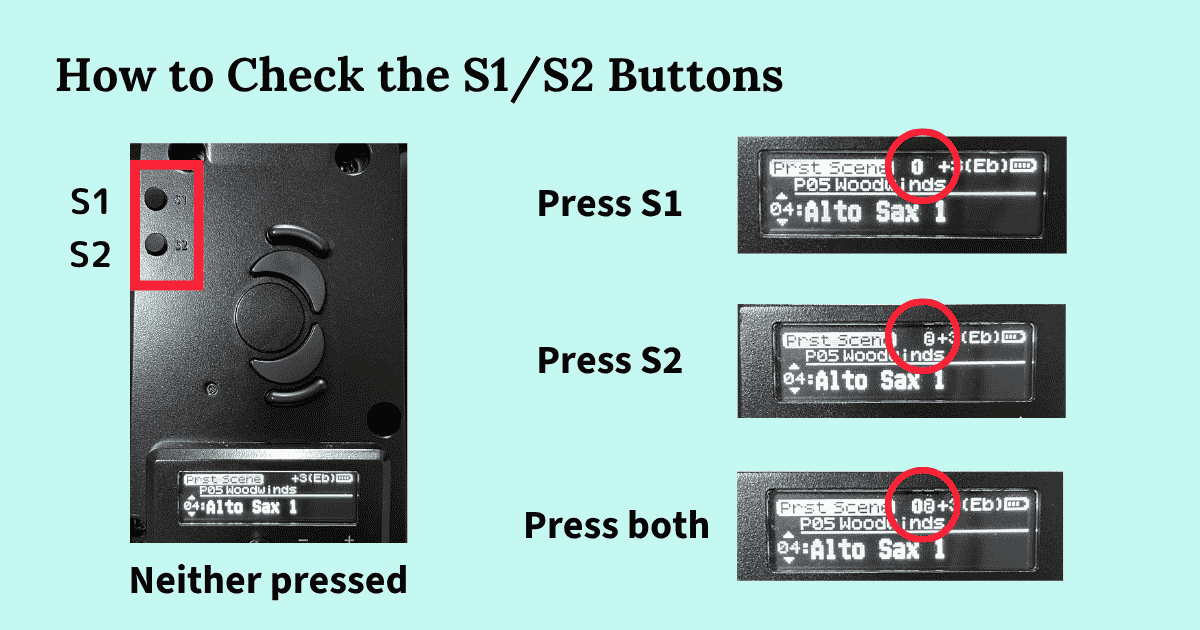
The S1 and S2 buttons are just above and to the left of the octave key.
When neither button is active, the space to the left of the key setting on the display — for Alto Sax 1 that's +3 E♭ — is blank.
Press S1 or S2 and the display shows ① or ②. Press both and it shows ①②.
So when the sound goes strange, check the display first and see whether one of those marks has appeared. If it has, press the button again to switch it back off, and you're done.
Roland Aerophone AE-20
See full specs and details on the official page:
Roland Aerophone AE-20 — Official Product Page
What You Can Assign to the S1/S2 Buttons
At first I had no idea what these buttons were even for. All they seemed to do was ruin my sound whenever I brushed against them. But the S1/S2 buttons are actually remarkably capable — you can assign your own functions to them.
My daily practice still keeps me fully occupied, so I haven't got as far as customising my own sounds. But here are some examples of what you can set:
- Effect settings such as chorus and reverb
- Switching sounds (scenes): jumping to the previous or next scene
- Adding a note an octave above or below, or a harmony
By assigning your own functions to S1 and S2, you can widen your range of expression considerably. The fact that you can add effects like chorus and reverb on the instrument itself, with no other equipment, is pretty amazing when you think about it.

I had a good poke around the EDITOR screen in the Aerophone Pro Editor app from a beginner's point of view — honestly, it was still a bit much for me!
The Default S1/S2 Settings for Each Sound
Now let's look at what's already assigned to those buttons before you change anything.
Every sound (scene) on the AE-20 comes with its own S1/S2 defaults.
For example, with P05-04 Alto Sax 1, S1 is set to "Vib" (vibrato) and S2 is set to "fall" — a quick downward slide in pitch.
That "bwoop" I described at the very start of this article? That's the fall on the S2 button, doing exactly what it was designed to do.
Once you know it's a fall, playing around with it is actually rather fun. It's only alarming when you have no idea it's there.
You can look up the defaults for every scene in the Scene List PDF from the support page linked just above.
Summary
The reason your sound suddenly changes mid-performance isn't a fault with your instrument — it's the S1/S2 buttons being pressed by accident.
If you practise on Alto Sax 1 in particular, the fall assigned to S2 produces that startling "bwoop", and I imagine plenty of players have jumped at it the way I did.
When the sound changes, the first thing to check is whether S1 or S2 has been pressed.
I never imagined at the beginning that these two small buttons could hold such advanced functions.
But one of the loveliest things about the Aerophone is that you can enjoy it fully without setting up any of the complicated features. Simply changing the sound (scene) is a pleasure in itself.
Kind to beginners, and capable of answering the demands of experienced players too — that's what makes this instrument so special. I hope you find plenty of your own ways to enjoy it, wherever in the world you are.