Some Notes Won't Sound on the Aerophone? 2 Fingering Points to Check
🌐 Read this article in Japanese(この記事を日本語で読む)
Hi, I'm Shuko.
Your fingering is correct — and yet one particular note keeps dropping out. Has that ever happened to you while practicing the Aerophone?

I'm sure my fingering is right, but sometimes the note just doesn't come out…
It's easy to start worrying that you've bought a faulty unit with a bad key contact.
In most cases, though, it isn't a broken key. It's usually one of two things: you're pressing a key you didn't mean to press, or a key you think you're holding down has come slightly up.
The Aerophone's keys are remarkably sensitive, so even the smallest shift changes whether a note sounds.
In this article I'll walk through both causes, how to check for them, and a free app that makes fingering easy to verify. Feel free to jump to what you need from the contents below.
Contents
Two Reasons a Note Won't Sound
If your problem isn't the batteries, the adapter, or the speaker settings, but rather a specific note that sounds sometimes and not others, there are two things I'd like you to check.
You're sure the fingering is right, so it's genuinely puzzling. Before you suspect a faulty key, try these two.
- Are you accidentally pressing a key you don't need?
- Is a key you think you're pressing actually floating, because your finger has relaxed?
Let's look at each one.
You're pressing an extra key (the side keys)
First, the case where a key reacts without you realizing it.
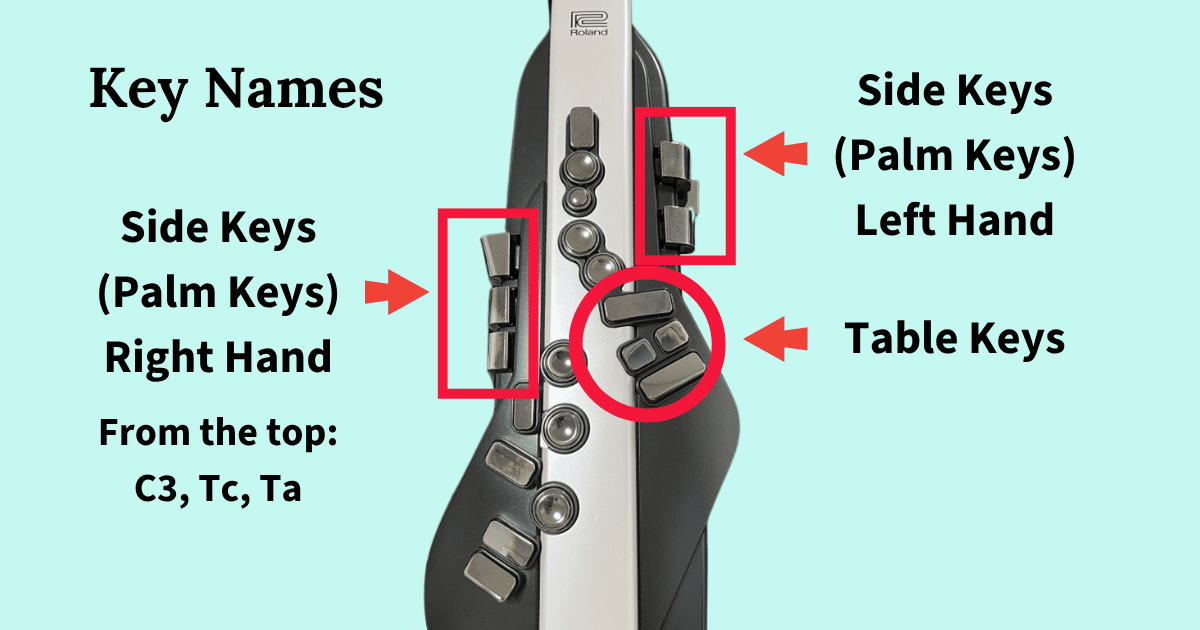
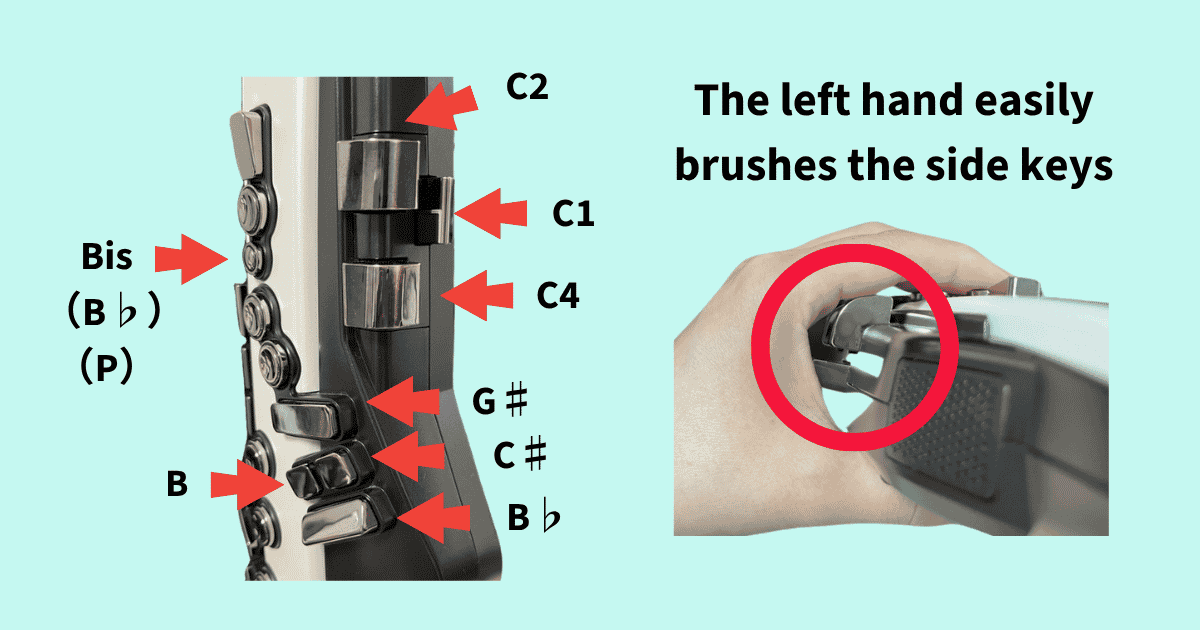
A note that comes and goes is often caused by accidentally pressing a side key.
The Aerophone judges "pressed" very sensitively. A key you only mean to rest a finger on will register if you tense up and push in even slightly.
The side of your left index finger sits close to the C1 and C2 keys, which makes it easy to press one by accident. Watch for it in situations like these:
- When your left index finger tenses up — on B in the middle register, for example
- When your left little finger works the table keys (B, C♯, B♭)
- When you're holding the Bis key
If you have small hands, be especially careful about brushing the side keys.
A key isn't fully pressed (the ring finger and others)
Now the opposite: a key you think you're pressing that has actually floated up.
Just as "pressed" is judged sensitively, so is "not pressed." You can believe you're holding a key down while your finger has lifted the tiniest amount. These are the fingers most likely to float:
- Left ring finger
- Right ring finger and right little finger
- Left thumb on the octave key
- Left index finger on the Bis key
My own left ring finger is the one that floats most. The more fingers you're using at once, the harder it becomes to keep any pressure in that one — and the right ring finger and little finger float just as easily.
The left thumb on the octave key drifts up now and then too, when my attention is on the other nine fingers. And when I'm being careful not to hit the side keys, the fingers on the Bis side end up floating instead. Keeping all ten under control at once is genuinely hard.
That said, pressing too hard to be safe makes your fingers slower to move. Tensing up can even make your wrist ache, so finding the right balance takes practice.
Roland Aerophone AE-20
See full specs and details on the official page:
Roland Aerophone AE-20 — Official Product Page
How to Check When a Note Won't Sound
Here's how I actually check when a note refuses to come out.
The symptom probably shows up on the same note every time — "it's always this one!"
When it happens, stop playing and take a careful look at whether a side key is being pressed, or a finger has floated up.
You'll often find another key pressed somewhere you'd never have expected, or a finger lifted off. Once you've checked the keys consciously, play the passage again slowly.
Using the Aerophone Lesson app
A free app called Aerophone Lesson lets you check your fingering. It works with the AE-20 and AE-30, connecting to your phone or tablet over Bluetooth.
The keys you press respond on screen in real time, so an extra key or a floating finger shows up immediately.
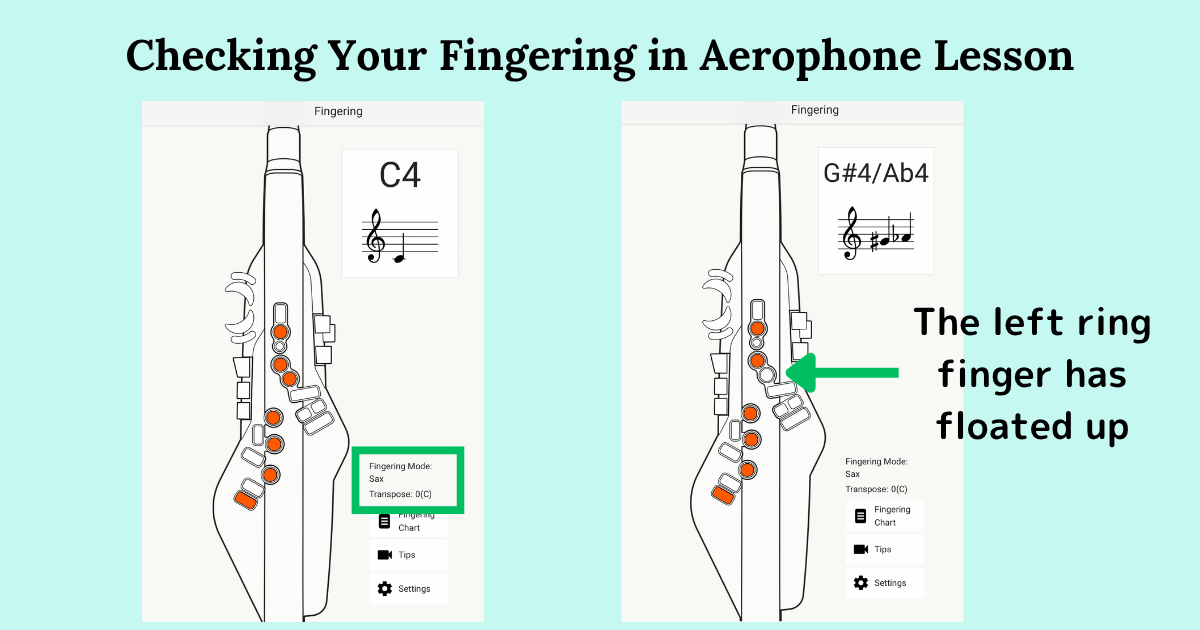
Aerophone Lesson is free on both iOS and Android. You can find the download links on Roland's official page: Aerophone Lesson — Roland Official Page
Summary
If a note sounds sometimes and not others, start with those two checks: an extra key being pressed, or a finger floating up.
The free Aerophone Lesson app is a real help for verifying fingering, too.
If you tense up, you press keys you never meant to. If you relax, your fingers float. It really isn't easy. But let's keep practicing together until we find that middle ground.
Enjoy! Aerophone!