My Aerophone AE-20 Settings After 4 Years: Volume, Breath, and Bite
🌐 Read this article in Japanese(この記事を日本語で読む)
Hi, I'm Shuko.

Is it fine to just leave the Aerophone on its factory settings?
What settings do other players actually use?
Have you found yourself wondering that? There are quite a few parameters in the menu, and it isn't obvious which ones to change or how far to move them.
Here's what I've come to believe: the key to improving is not making things difficult for yourself at the start. Setting the instrument up so that it's easy for you to blow turned out to be the fastest route forward.
In this article I'm sharing the settings I've arrived at after four years — as someone who had never played a wind instrument before picking up the Aerophone.
I'll cover four things: volume, Breath Curve, Breath Adjust, and Bite Ctrl Mode. For each one, what it actually does and how to choose a value.
If you're not sure where to begin, I hope this gives you a starting point. Feel free to jump to any section from the table of contents below.
* This article draws on the AE-20 Owner's Manual, the Song & Guide Book, the Parameter Guide, and Roland's support pages. Parameter names follow the AE-20's English display.
* This page may contain affiliate links.
Contents
The Short Answer
I've spent a lot of time experimenting, trying to find the settings that would help me improve.
The answer I landed on: start with whatever feels easiest for you to play.
There's no need to make things hard on yourself at the beginning. You can shift toward more demanding settings gradually, as you get used to the instrument.
My current settings
| Setting | Situation | Value |
|---|---|---|
| Volume ① Headphones or earphones | Practicing at home | 3–4 |
| Volume ② Built-in speakers (no headphones, no amp) | In-person lessons | 8 |
| Volume ③ Amplifier | Recitals | Adjusted at the amp (instrument set to 3–4) |
| Breath Curve | — | L3 |
| Breath Adjust | — | 20 |
| Bite Ctrl Mode | — | E-Wind |
Volume
Volume runs from 0 to 11. You can change it with the knob on the instrument, or from the menu under Speaker Volume and Output Volume.
Practicing at home
When you practice at home, wired headphones or earphones are a must.
The sound is far better than the built-in speakers, which makes it much easier to lose yourself in practice.
How it sounds depends on the headphones you use, so adjust to whatever level feels comfortable to you.
Your Breath Curve and Breath Adjust settings — both covered below — also change how loud the instrument feels.
In-person lessons (built-in speakers only)
The built-in speakers can't match headphones for volume or sound quality.
And the louder you push them, the more easily the sound distorts.
I use around 8 for lessons. In a small room, somewhere between 6 and 8 seems about right.
Recitals and other times you use an amp
With an amplifier, you can get volume and sound quality on par with headphones. You can also set the level at the amp itself, so I'd recommend using one any time you play in a larger space.
Breath Curve
The Aerophone has a breath sensor that detects how hard you blow, so the force and speed of your breath control how loud each note is.
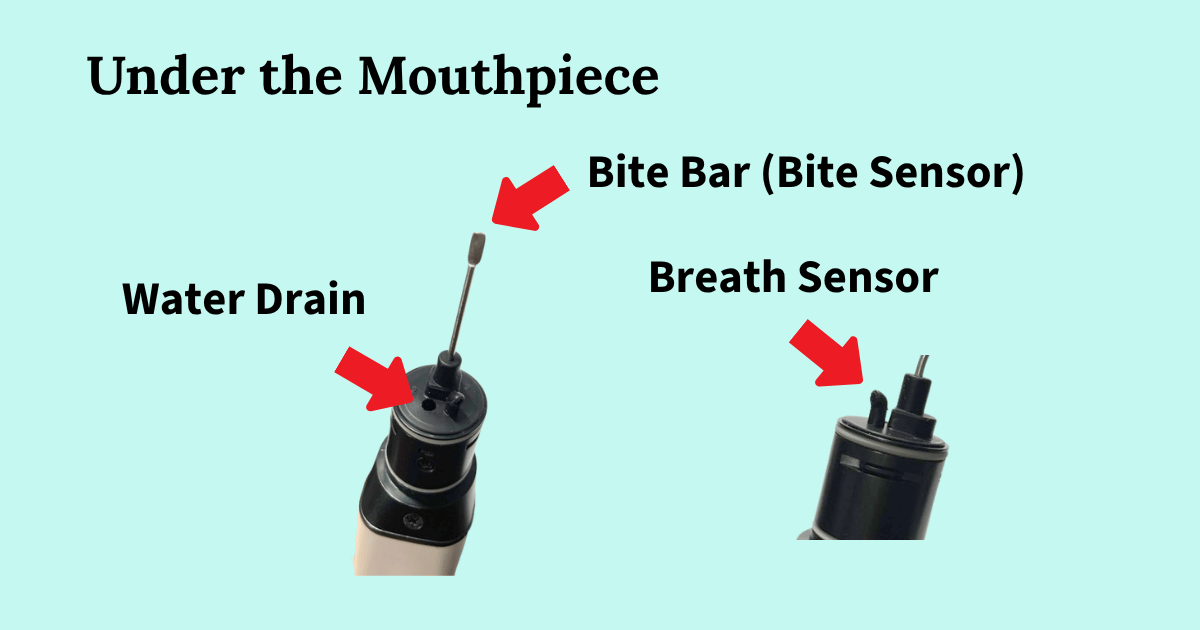
Blow harder and you get a bigger sound; blow gently and it gets quieter.
There are 11 steps, running from the lightest — L5 through L1 — to M, and then H1 through H5. The factory setting is M.
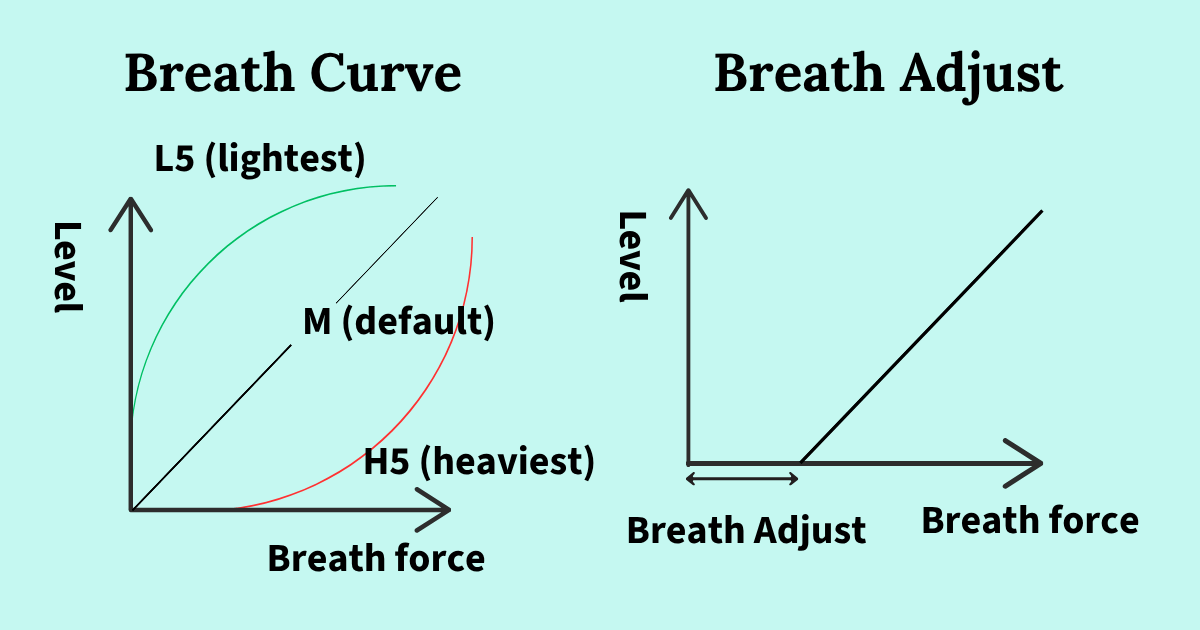
If you're new to wind instruments and find you run out of breath, try starting at L3 or L2.
What I'd aim for is a setting where you feel a little resistance when you blow hard. That makes it much easier to shape dynamics and other fine details within a piece. Set it too light and even a small breath produces a big sound, which leaves you very little room to play quietly.
Your embouchure — how you hold the mouthpiece — makes a difference too. Back when I was leaking a lot of air, I kept the setting on the lighter side.
If you already play saxophone regularly, something a little heavier may suit you better.
At a seminar I attended, a professional player said he sets his own breath curve light, at L3. I wrote about what he said here.
Roland Aerophone AE-20
See full specs and details on the official page:
Roland Aerophone AE-20 — Official Product Page
Breath Adjust
This one sets how much breath it takes before a note starts to sound. The graph on the right in the image above shows this.
The range is 1 to 50, and the factory setting is 20. The higher the number, the harder you have to blow before you hear anything at all.
A lower number makes it easier to get a sound, but a value with a little resistance in it makes dynamics easier to express. As you get used to playing, your breath strength builds up on its own.
I don't know whether this is the textbook approach, but personally I find Breath Adjust gives me finer control over that sense of resistance than Breath Curve does.
Bite Ctrl Mode
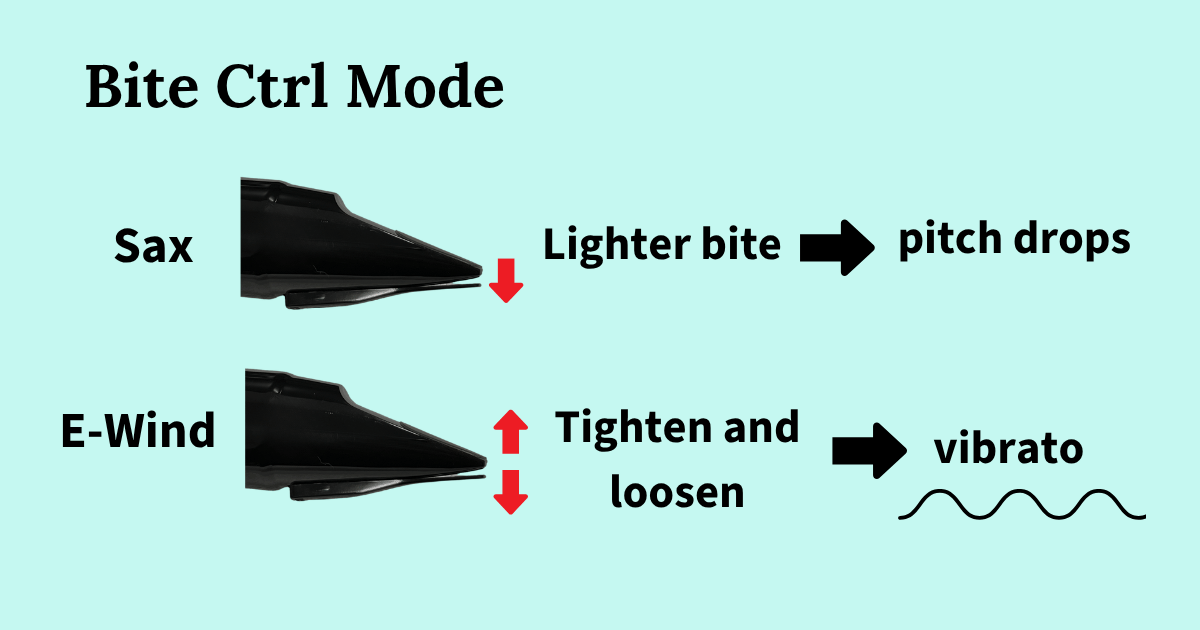
"Bite" means exactly what it sounds like — biting. By tightening or relaxing the way you hold the mouthpiece, you change how firmly the reed presses against the bite bar, and that lets you control pitch or add vibrato.
| Setting | What it does |
|---|---|
| Off | Turns off bite sensor control. |
| Sax | Lets you control pitch with how firmly you hold the mouthpiece, the way you would on an acoustic saxophone. |
| E-Wind | Lets you add vibrato by loosening and tightening your hold on the mouthpiece. |
What I'd recommend for beginners
If you're new to wind instruments and don't play acoustic saxophone, I'd start with either Off or E-Wind.
In Sax mode, your pitch won't be right unless you control the position of the reed precisely.
For example, take the fingering for C — on the AE-20's default sax fingering, that sounds as a concert E♭, like an alto saxophone. If your bite is too loose, what comes out is closer to a D. You have to hold the mouthpiece just right, and tune as you go, to get a true E♭.
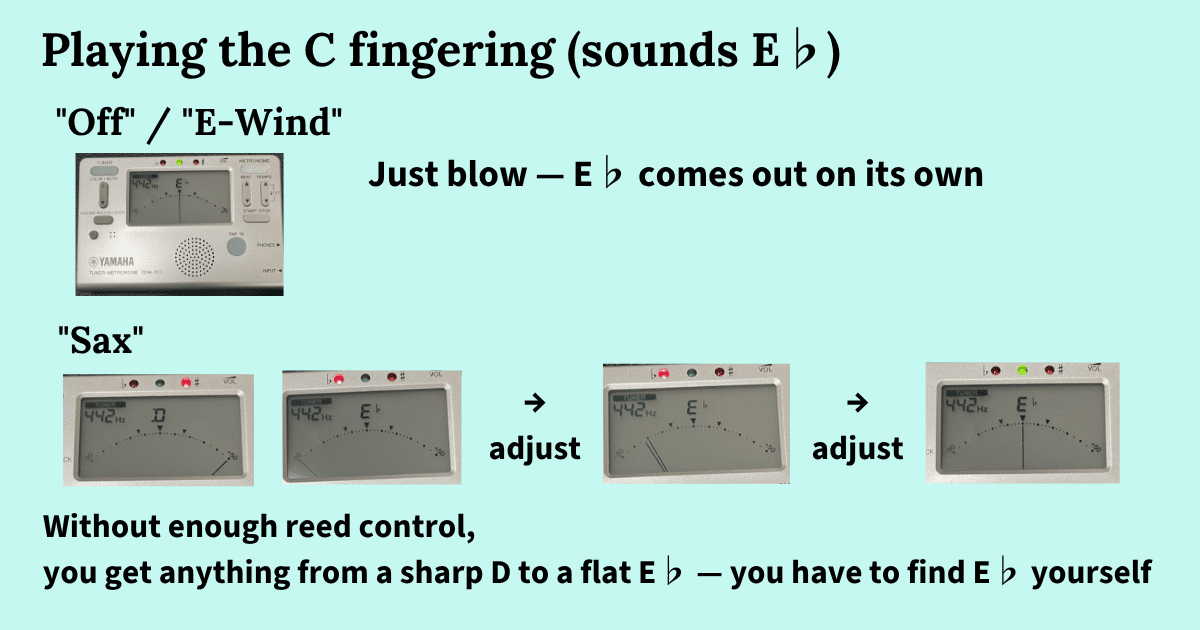
And if your pitch is off, you won't be in tune with your accompaniment.
Until your embouchure is stable, biting hard can leave your lower lip sore, so I'd save this mode for once you've settled in a bit.
With Off or E-Wind there's no tuning to worry about — anyone can pick the instrument up and get a sound easily, and that's a big part of the Aerophone's appeal.
I still can't play well in Sax mode myself. Keeping every note in tune while you're playing is difficult.
Summary
That's how I have my Aerophone AE-20 set up, as someone who started out with no wind instrument experience at all.
Play with the factory settings first. If you find yourself running out of breath and struggling, try bringing Breath Curve or Breath Adjust down.
For Bite Ctrl Mode, I'd recommend Off or E-Wind.
They're comfortable, and they let you concentrate on playing. Once the instrument feels familiar, you can start changing things little by little.
Whatever feels good to blow is the right setting. Being able to tailor everything to your own stamina, ability, and technique is one of the real strengths of an electronic instrument.
Here's to enjoying life with the Aerophone!